1、关于Office 文件读写
在日常开发中,Office文档的读写操作还是颇为常见。其中Excel文件(xls和xlsx格式)的读写操作是最为频繁。在众多的Excel读写工具包中,POI不是最快,也不是最优秀的,但它是最稳定的;因为,它由Apache基金会管理。在超大Excel文件(xlsx格式)的读写上,POI提供了一种低内存占用的处理方式。并且,作为一套完整的解决方案,POI工具包也提供了Word文档和Power Point文档的读写。
官网链接如下:https://poi.apache.org/
下面的这段介绍,翻译自Apache POI 官方网站:
Apache POI 项目的任务是创建和维护 Java API,用于操作各种根据 Office Open XML 标准 (OOXML) 和 Microsoft 的 OLE 2 复合文档格式 (OLE2)文件格式的文档。简而言之,您可以使用 Java 读取和写入 MS Excel 文件。此外,您还可以使用 Java 读取和写入 MS Word 和 MS PowerPoint 文件。Apache POI 是您的 Java Excel 解决方案(适用于 Excel 97-2008)。我们有一个完整的 API 用于移植其他 OOXML 和 OLE2 格式,并欢迎其他人参与。
Maven Java 项目中的 pom.xml 依赖信息如下:
<!-- https://mvnrepository.com/artifact/org.apache.poi/poi -->
<dependency>
    <groupId>org.apache.poi</groupId>
    <artifactId>poi</artifactId>
    <version>5.2.5</version>
</dependency>

<!-- https://mvnrepository.com/artifact/org.apache.poi/poi-ooxml -->
<dependency>
    <groupId>org.apache.poi</groupId>
    <artifactId>poi-ooxml</artifactId>
    <version>5.2.5</version>
</dependency>

<!-- https://mvnrepository.com/artifact/org.apache.logging.log4j/log4j-core -->
<!-- 因为poi使用了log4japi,所以要添加一个core依赖,匹配它的api包。-->
<dependency>
    <groupId>org.apache.logging.log4j</groupId>
    <artifactId>log4j-core</artifactId>
    <version>2.21.1</version>
</dependency>
2、关于Apache POI中Excel读写的API说明
对于Excel文档读写,POI提供3种处理方式:HSSF、XSSF、SXSSF;本文中暂时不讨论SXSSF的处理方式。因为它属于超大Excel文档读写,用得比较少。
l 对于老的xls格式Excel文档,使用HSSF方式读写。
l 对于2007之后的xlsx格式Excel文档,使用XSSF方式读写。
l 对于2007之后的xlsx格式的超大Excel文档,使用SXSSF读写。
在POI工具包设计上,有一套完整的接口对象:Excel文档- Workbook,数据页- Sheet,单元格-Cell。所以,我们编程时,可以利用Java中的多态特性,直接面向接口编程。
POI 官方Java doc 如下:https://poi.apache.org/apidocs/index.html,大家可以自行查找构造方法和操作函数。
3、Excel文件的对象创建
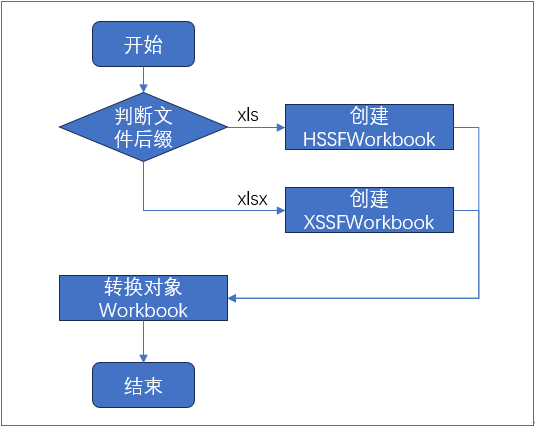
样例代码如下:
(1) 创建新的 Excel 工作簿 Workbook 对象
//生成 Excel 文件对象
Workbook wb = null;
if(suffix.equalsIgnoreCase("xls")) {
       //旧版excel文件
       wb = new HSSFWorkbook();
} else if(suffix.equalsIgnoreCase("xlsx")) {
       //新版excel文件
       wb = new XSSFWorkbook();
}
(2) 通过已有的Excel工作簿创建对象(fin是文件输入流)
Workbook wb = null;
if(!suffix.equalsIgnoreCase("xls") && !suffix.equalsIgnoreCase("xlsx")) {
       throw new Exception("指定的类型异常,文件不是Excel文件。");
}
if(suffix.equalsIgnoreCase("xls")) {
       //旧版excel文件
       wb = new HSSFWorkbook(fin);
} else if(suffix.equalsIgnoreCase("xlsx")) {
       //新版excel文件
       wb = new XSSFWorkbook(fin);
}
4、Excel文件的数据页读写
按照数据模型,工作簿对象是按照这个( Workbook -> Sheet -> Cell )层次构建的。所以如果我们要读写Excel,需要通过 Workbook 对象来获取 Sheet 对象,然后通过 Sheet 对象获取 Cell 对象;最后读写Cell对象来实现数据的读写。
Excel文件的保存,一般都是调用 Workbook 对象的 write 方法。write 方法的参数一般都是一个文件输出流,请注意文件流的处理。
以下是一个简单的写入样例:
public static void main(String[] args) throws Exception {
       //操作系统用户主目录
       String userDir = System.getProperties().getProperty("user.home");
       //文件所在文件夹
       String fileDir = userDir+File.separator+"examproj";
       //文件路径
       String filePath = fileDir+File.separator+"mytest.xlsx";
       //目录初始化
       initHomeDir(fileDir);
       //获取文件后缀
       String suffix = getSuffix(filePath);
       //创建一个新的Excel对象
       Workbook wb = getNewWorkbook(suffix);
       //创建一个数据页
       Sheet sheet0 = wb.createSheet("第一页");
       //创建第一行对象
       Row row0 = sheet0.createRow(0);
       //在第一行,写2个单元格(字符串形式)
       row0.createCell(0).setCellValue("姓名");
       row0.createCell(1).setCellValue("年龄");
       //创建第二行对象
       Row row1 = sheet0.createRow(1);
       //在第二行,写2个单元格(字符串+数字形式)
       row1.createCell(0).setCellValue("李斯");
       row1.createCell(1).setCellValue(125);
       System.out.println("开始写入数据...");
       //保存数据
       FileOutputStream fout = null;
       try {
              fout = new FileOutputStream(filePath);
              wb.write(fout);
              System.out.println("数据写入完成...");
       }catch(Exception e) {
              System.out.println("执行文件保存失败,"+e.getMessage());
              throw e;
       }finally {
              if(fout!=null) {
                     try {fout.close();} catch (Exception e) {}
                     fout = null;
              }
              System.out.println("资源回收完成...");
       }
}
以下是一个简单的读取样例:
public static void main(String[] args) throws Exception {
       //操作系统用户主目录
       String userDir = System.getProperties().getProperty("user.home");
       //文件所在文件夹
       String fileDir = userDir+File.separator+"examproj";
       //文件路径
       String filePath = fileDir+File.separator+"mytest.xlsx";
       //目录初始化
       initHomeDir(fileDir);
       //获取文件后缀
       String suffix = getSuffix(filePath);
       //读取数据
       FileInputStream fin = null;
       try {
              fin = new FileInputStream(filePath);
              //读取Excel对象
              Workbook wb = getNewWorkbook(suffix, fin);
              //查看Excel有多少页
              int sheetNum = wb.getNumberOfSheets();
              if(sheetNum>0) {
                     //读取第一页
                     Sheet sheet0 = wb.getSheetAt(0);
                     System.out.println("数据页名:"+sheet0.getSheetName());
                     //看看数据页有多少行内容(如果没有内容,行号会返回-1)
                     int minRow = sheet0.getFirstRowNum();
                     int maxRow = sheet0.getLastRowNum();
                     if(minRow>=0 && maxRow>=0) {
                            //以第一行的长度为标准,读取列
                            int minCol = sheet0.getRow(0).getFirstCellNum();
                            //最后一列的列码是列号+1
                            int maxCol = sheet0.getRow(0).getLastCellNum();
                            if(minCol>=0 && maxCol>0) {
                                   //循环遍历
                                   for(int rowNum=0; rowNum<=maxRow; rowNum++) {
                                          System.out.print("第"+rowNum+"行:");
                                          Row tmpRow = sheet0.getRow(rowNum);
                                          for(int colNum=0; colNum<maxCol; colNum++) {
                                                 //解析celltype
                                                 System.out.print(getCellValue(tmpRow.getCell(colNum)));
                                                 if(colNum<maxCol-1) {
                                                        System.out.print(", ");
                                                 }
                                          }
                                          System.out.println();
                                   }
                            }else {
                                   System.out.println("数据页的列信息异常...");
                            }
                     }else {
                            System.out.println("该数据页("+sheet0.getSheetName()+")没有数据...");
                     }
              }else {
                     System.out.println("这个文件没有数据页");
              }
       }catch(Exception e) {
              System.out.println("执行文件读取失败,"+e.getMessage());
              throw e;
       }finally {
              if(fin!=null) {
                     try {fin.close();} catch (Exception e) {}
                     fin = null;
              }
              System.out.println("资源回收完成...");
       }
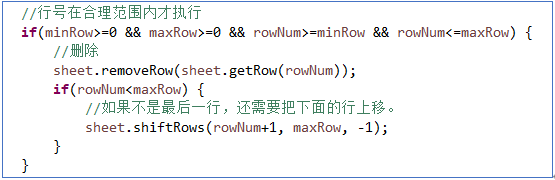
}注意:如果要删除行数据,需要特殊的处理方式。即先调用 remove 方法,后调用 shift 方法将后面的数据行向上移动。这里不作演示。
5、可能用到的工具方法
//获取文件后缀
private static String getSuffix(String filePath) throws Exception {
       return filePath.substring(filePath.lastIndexOf(".")+1);
}

//初始化主目录
private static void initHomeDir(String fileDir) {
       File myDir = new File(fileDir);
       if(!myDir.exists() || !myDir.isDirectory() ) {
              //如果不存在,或者存在但不是文件夹,则需要创建
              myDir.mkdirs();
       }
}

//获取Excel文件对象(新建)
private static Workbook getNewWorkbook(String suffix) throws Exception {
       //生成 Excel 文件对象
       Workbook wb = null;
       if(suffix.equalsIgnoreCase("xls")) {
              //旧版excel文件
              wb = new HSSFWorkbook();
       } else if(suffix.equalsIgnoreCase("xlsx")) {
              //新版excel文件
              wb = new XSSFWorkbook();
       }else {
              throw new FilerException("Excel文件后缀(suffix="+suffix+")错误,无法识别。");
       }
       return wb;
}

//获取Excel文件对象(从文件流获取)
private static Workbook getNewWorkbook(String suffix, FileInputStream fin) throws Exception {
       //生成 Excel 文件对象
       Workbook wb = null;
       if(suffix.equalsIgnoreCase("xls")) {
              //旧版excel文件
              wb = new HSSFWorkbook(fin);
       } else if(suffix.equalsIgnoreCase("xlsx")) {
              //新版excel文件
              wb = new XSSFWorkbook(fin);
       }else {
              throw new FilerException("Excel文件后缀(suffix="+suffix+")错误,无法识别。");
       }
       return wb;
}

//将单元格信息,以字符串方式返回。
private static String getCellValue(Cell cell) {
       String result = null;
       if(cell!=null) {
              CellType type = cell.getCellType();
              if(type.equals(CellType.NUMERIC)) {
                     result = cell.getNumericCellValue()+"";
              }else if(type.equals(CellType.STRING)) {
                     result = cell.getStringCellValue();
              }else if(type.equals(CellType.FORMULA)) {
                     result = cell.getStringCellValue();
              }else if(type.equals(CellType.ERROR)) {
                     result = cell.getErrorCellValue()+"";
              }else if(type.equals(CellType.BOOLEAN)) {
                     result = cell.getBooleanCellValue()+"";
              }else if(type.equals(CellType.BLANK)) {
                     result = "";
              }else if(type.equals(CellType._NONE)) {
                     result = "";
              }else {
                     result = "<未知数据类型>";
              }
       }
       return result;
}
本章完结。