笨方法学 Java -28-综合练习2-实现分析-Word 文本提取
一、前言
从这章节开始,我们就要着手研究 Office Word 文档的读、写操作了。在开始前,我们先确认下软件包的依赖关系。在《笨方法学 Java -21-综合练习1-实现分析-Excel文件读写》中,我们已经添加了关于POI的软件依赖。如下:
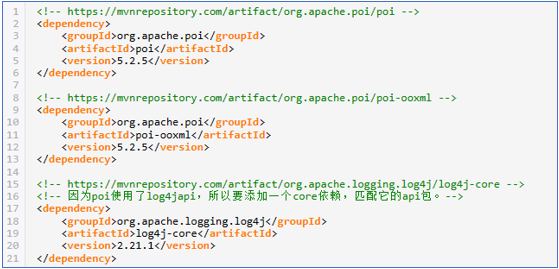
为了能顺利解析Office Word文档,我们还需要追加一个 poi-scratchpad 依赖关系如下:
<!-- https://mvnrepository.com/artifact/org.apache.poi/poi-scratchpad   -->
<dependency>
    <groupId>org.apache.poi</groupId>
    <artifactId>poi-scratchpad</artifactId>
    <version>5.2.5</version>
</dependency>
二、关于Office Word文档的解析方式
其实,在POI组件中,Word 文档有2种解析方式:使用文本提取器一次性读取 和 使用文档对象逐个解析。这2种方式,我们本次综合练习2都会涉及。
在系统功能上,我们有一个查看模板信息的功能。为了简化实现,我们就使用文本提取器(Extractor)来获取模板的文本信息。
三、文本提取器的使用
在POI组件中,它提供了2个关于Word文档的文本提取器:
l 关于doc格式文档的提取器 org.apache.poi.hwpf.extractor.WordExtractor
l 关于docx格式文档的提取器 org.apache.poi.xwpf.extractor.XWPFWordExtractor
在组件设计上,2个提取器都实现了接口 org.apache.poi.extractor.POITextExtractor。因此,我们可以在代码处理上,减少一些差异化处理。通过Java的多态特性,转换为面向接口 POITextExtractor 的文本提取。
四、样例功能实现
注意:
1、这里只是演示如何使用文本提取器,所以不用太关注资源回收,第五点内容才是完整的实现代码。
2、这里getText方法获取的文本不单单是正文内容,还包含页眉、页脚信息。
public static void main(String[] args)   throws Exception {
    //操作系统用户主目录
    String userDir =   System.getProperties().getProperty("user.home");
    //文件所在文件夹
    String fileDir = userDir+File.separator+"examproj";
    //模板文件路径
    String oldFilePath = fileDir+File.separator+"请假单模板(旧).doc";
    String newFilePath = fileDir+File.separator+"请假单模板(新).docx";
    //文档对象
    HWPFDocument oldDoc = new HWPFDocument(new FileInputStream(oldFilePath));
    XWPFDocument newDocx = new XWPFDocument(new FileInputStream(newFilePath));
    //创建提取器
    POITextExtractor oldExtor = new WordExtractor(oldDoc);
    POITextExtractor newExtor = new XWPFWordExtractor(newDocx);
    //输出提取的信息(提取的内容可能包含格式符,替换为空格)
    System.out.println("旧模板信息:"+oldExtor.getText().replaceAll("\\s+",   " "));
    System.out.println("新模板信息:"+newExtor.getText().replaceAll("\\s+",   " "));

    // ============== 下面开始关闭资源,这里是练习,所以随便关闭下
    //关闭提取器
    oldExtor.close();
    newExtor.close();
    //关闭文档
    oldDoc.close();
    newDocx.close();
    //关闭输入流
}
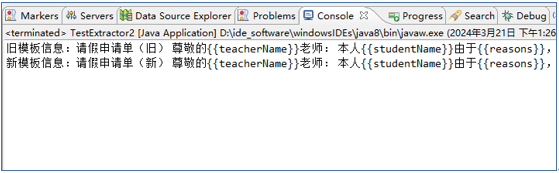
结果如下:
五、综合练习2的项目代码展现
/**
 * >> 通过提取器,获取纯文本然后返回。
 * @param filePath 文件路径
 * @return Word 文档的正文内容
 * @throws Exception 当发生异常情况,抛出异常由外部程序处理
 */
public static final String getTextByExtractor(String filePath) throws Exception {
    String result = null;
    if(filePath==null || filePath.trim().length()<=0) {
        throw new Exception("传入的参数filePath为空,请检查");
    }
    //文件后缀
    String suffix = filePath.substring(filePath.lastIndexOf(".")+1);
    //
    FileInputStream fin = null;
    POITextExtractor textExtrator = null;
    XWPFDocument documentX = null;
    HWPFDocument documentH = null;
    //
    try {
        fin = new FileInputStream(filePath);
        if(suffix.equalsIgnoreCase("doc")) {
            documentH = new HWPFDocument(fin);
            textExtrator = new WordExtractor(documentH);
        }else if(suffix.equalsIgnoreCase("docx")) {
            documentX = new XWPFDocument(fin);
            textExtrator = new XWPFWordExtractor(documentX);
        }else {
            throw new FileNotFoundException("传入的文档识别异常,无法识别为word文档,请检查文件路径[filePath="+filePath+"]");
        }
        //将文档中的内容读取(获取的内容带有格式,所以替换掉格式符。)
        String tmp = textExtrator.getText();
        result = tmp==null?"":tmp.replaceAll("\\s+", " ");
    } catch(Exception e) {
        throw e;
    } finally {
        if(textExtrator!=null) {
            try {textExtrator.close();} catch (Exception e) {}
            textExtrator=null;
        }
        if(documentX!=null) {
            try {documentX.close();} catch (Exception e0) {}
            documentX=null;
        }
        if(documentH!=null) {
            try {documentH.close();} catch (Exception e1) {}
            documentH=null;
        }
        if(fin!=null) {
            try {fin.close();} catch (Exception e2) {}
            fin=null;
        }
    }
    return result;
}
本章节完结。